Page 1 of 1
Side Panel Scrollbar Shown Even When Not Needed
Posted: 14.12.2025 14:41
by katwalk
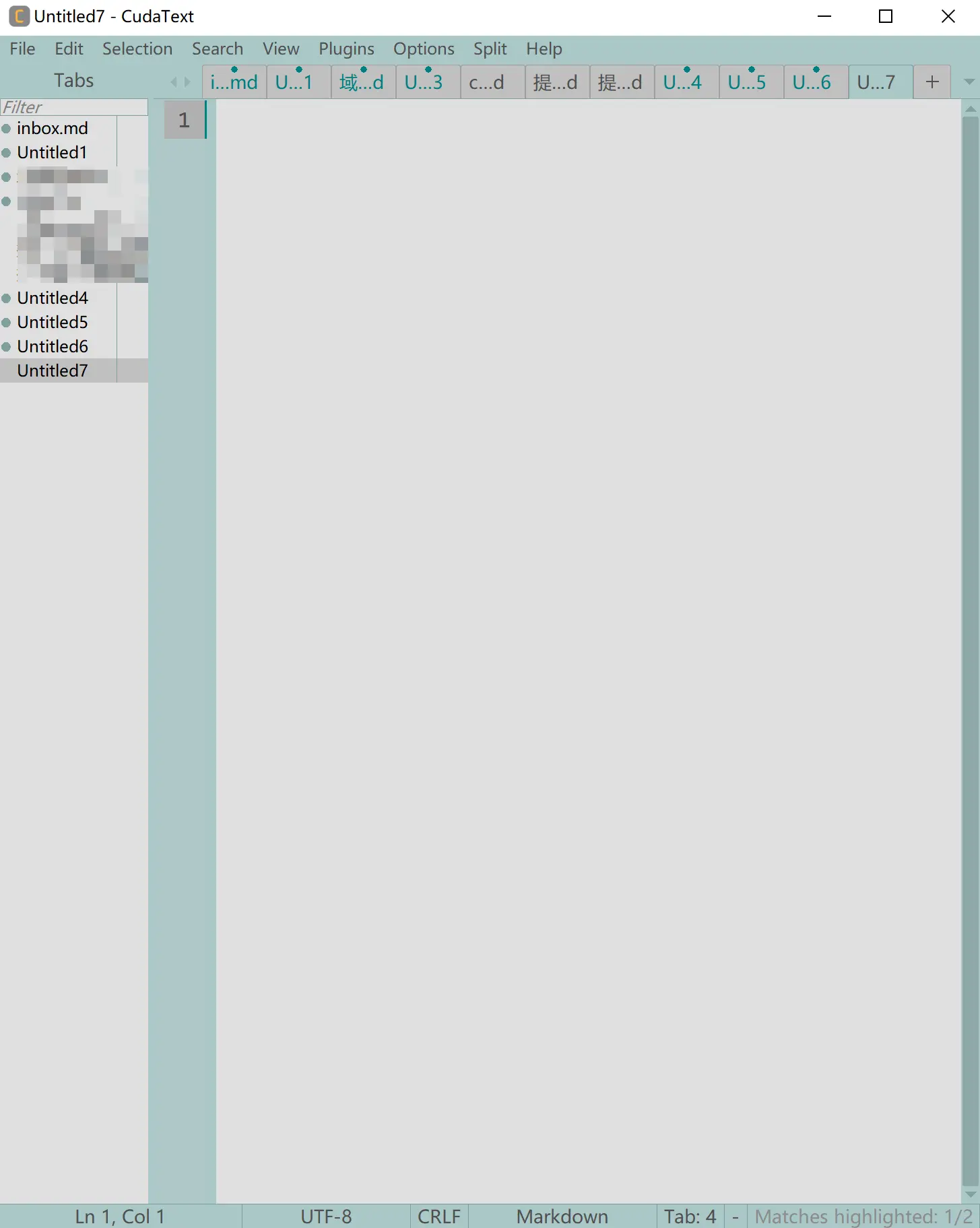
There is a visual issue with CudaText’s side panel. Even when the content does not exceed the panel height, a scrollbar is shown by default.
Screenshot:
https://s.lu/C9Sr
The scrollbar is very thick and sits inside the side panel, which looks like a heavy divider line. It seriously hurts the overall look of CudaText and makes the space feel cramped and blocked.
It would be great to optimize this by hiding the scrollbar when the content does not overflow. Another option is to make it thinner so it feels less intrusive and removes that boxed in visual feeling.
Re: Side Panel Scrollbar Shown Even When Not Needed
Posted: 14.12.2025 15:59
by main Alexey
it was very easy to change for Listbox controls. changed, now Snippet Panel / Tabs List / Cmd Palette don't show scrollbar if no need.
it is harder to change for treeview controls (Code tree, Project manager).
Re: Side Panel Scrollbar Shown Even When Not Needed
Posted: 14.12.2025 17:08
by katwalk
Awesome, I am really glad to see you have already added this change.
I just updated to the latest version I can download right now, 1.230.5.0, but it looks like the hide scrollbar behavior is not taking effect yet.
Could you let me know roughly which version this change is expected to ship in? That way I can keep an eye out for the update. Thanks a lot.
Re: Side Panel Scrollbar Shown Even When Not Needed
Posted: 14.12.2025 18:12
by main Alexey
It will be in the next update, version is 1.230.7.0 or bigger, expected after 15.December.
EDIT
code-tree / project-tree: vert-scrollbar will also auto-hide.
Re: Side Panel Scrollbar Shown Even When Not Needed
Posted: 15.12.2025 03:31
by katwalk
I am really glad to hear that you got the code tree and project tree working. Thanks for sticking with it and making it happen.
Hiding the scrollbars is a big improvement for the UI. It does not just look cleaner, it also makes the whole interface feel nicer and more comfortable to use.
By the way, the more I use CudaText, the more tabs I end up keeping open all the time, so the tab panel has basically become a constant part of my workflow.
A release after the 15th sounds good. I cannot wait to try it.
Re: Side Panel Scrollbar Shown Even When Not Needed
Posted: 15.12.2025 08:12
by main Alexey
pls show string from 'Copy' button from the About dialog. your OS/wigsetsets. so i can make beta.
Re: Side Panel Scrollbar Shown Even When Not Needed
Posted: 15.12.2025 08:52
by katwalk
CudaText 1.230.5.0, win64-x86_64-win32, fpc 3.2.3
Windows 10
Re: Side Panel Scrollbar Shown Even When Not Needed
Posted: 15.12.2025 09:04
by main Alexey
win64 beta. file cudatext.py must be updated in the 'py' folder!
https://github.com/Alexey-T/CudaText/di ... t-15257623
Re: Side Panel Scrollbar Shown Even When Not Needed
Posted: 15.12.2025 13:39
by katwalk
Got it! You rock.
I downloaded the beta to give it a spin. The scrollbar in tab sidebar is totally hidden now, and it looks instantly cleaner and much easier on the eyes.
Screenshot:
https://s2.loli.net/2025/12/15/ZBQ7DMwiRYxA9eO.webp
Thanks for the super fast turnaround on my feedback!